PhrasiGo vs Anki · 2026

Anki’s memory science, without the hours of card-making.

PhrasiGo schedules reviews with FSRS, the same algorithm family Anki offers. The difference is what happens before the first review: you type a sentence, and the translation, natural audio, both gendered forms and word-by-word meanings appear on their own.

100% freeNo ads35 languagesNo account needed to start
Choose PhrasiGo if
  • You are learning a language, and you would rather spend the evening speaking than formatting note types.
  • You want audio, speaking and listening practice built in, not bolted on.
  • You want spaced repetition switched on by default, with a forecast you can read at a glance.
  • You could use a nudge: streaks, a daily goal, something that makes review feel less like a chore.
Anki still fits if
  • You study things other than languages: anatomy, law, chess openings. Anki does not care what is on the card.
  • You want total control: card templates, scheduler parameters, add-ons, shared decks.
  • You live on the desktop, or you need your review schedule to follow you across devices today.
  • You already have years of decks and reviews and are not ready to start a fresh ledger.
1
field to fill in PhrasiGo: the sentence. Everything else is generated.
FSRS
in both apps. On by default in PhrasiGo; opt-in per deck in Anki [4]
7
ways to practice a phrase, versus flipping the card

Side by side

PhrasiGo vs Anki, feature by feature

Anki is a general-purpose flashcard engine you configure. PhrasiGo is a language app with a spaced-repetition engine inside it.

Feature PhrasiGo Anki
Making a card Type any sentence. It is translated, spoken aloud, split word by word and saved for practice. You type the front and the back yourself, or download a shared deck of someone else’s cards. [2]
Translation Automatic, with both ♂ and ♀ forms where the language has them. Not built in.
Audio Natural neural voice for every phrase, with word timings. Tap any word to hear just that word. Template-based text-to-speech using your operating system’s voices; you set it up per note type. [3]
Word-by-word meanings Tap any word for its meaning. Phonetic guide for non-Latin scripts. Not built in.
Scheduler FSRS-4.5 on every phrase, yours or the course’s. Switched on for everyone, nothing to configure. 7-day forecast. SM-2 by default. FSRS is available since 23.10 but must be enabled in deck options. [4]
How a review is graded Your answer grades the card: build it from a word bank, type it, or say it out loud. Self-graded: you flip the card and rate Again, Hard, Good or Easy yourself.
Speaking practice Speech-checked word by word. A mumble is a free retry, never a false pass. Not built in.
Listening and sentence-building Hear it and tap the words in order; build the translation from a word bank; replay your mistakes. Card flipping; typed-answer fields are possible.
AI conversation practice Talk: 10 scenarios, A1–B1, briefed on your own saved phrases. 30 conversations a day signed in. Not a feature.
Streaks, XP, leagues XP, 60-XP daily goal, streaks with automatic freezes, 7 leagues, Beat the Clock, Deep Dive. None built in; community add-ons only.
Guided course Learning Journey: 13 subjects, A1–B2, 120 units of 8 sentences per pair, 35 pairs. Human-curated. Shared decks made by other users, of varying quality. [2]
Works offline Saved phrases, their audio and your downloaded course work offline. Progress syncs when you are back. Fully offline on every platform.
Sync across devices Sentences, folders and progress sync with a Google sign-in. Your memory schedule stays on the device for now. AnkiWeb syncs decks and review history for free. [1]
Price Free. No paywall, no premium tier today. Fair-use limits: 100 new phrases and 200 speaking exercises a day, signed in. Free on Windows, macOS, Linux, Android and the web. AnkiMobile for iPhone and iPad is a one-time $24.99. [6]
Platforms Android on Google Play today. iPhone version in testing, coming soon. Desktop, iOS, Android and web.
Learning curve Add a sentence, start practicing. Powerful, and famously steep for newcomers. [8]

Bracketed numbers point to the sources at the bottom of this page. Anki details are as published on 2 September 2026; features and prices change, so check their site for today's terms.
Card creation

One sentence in, a whole card out

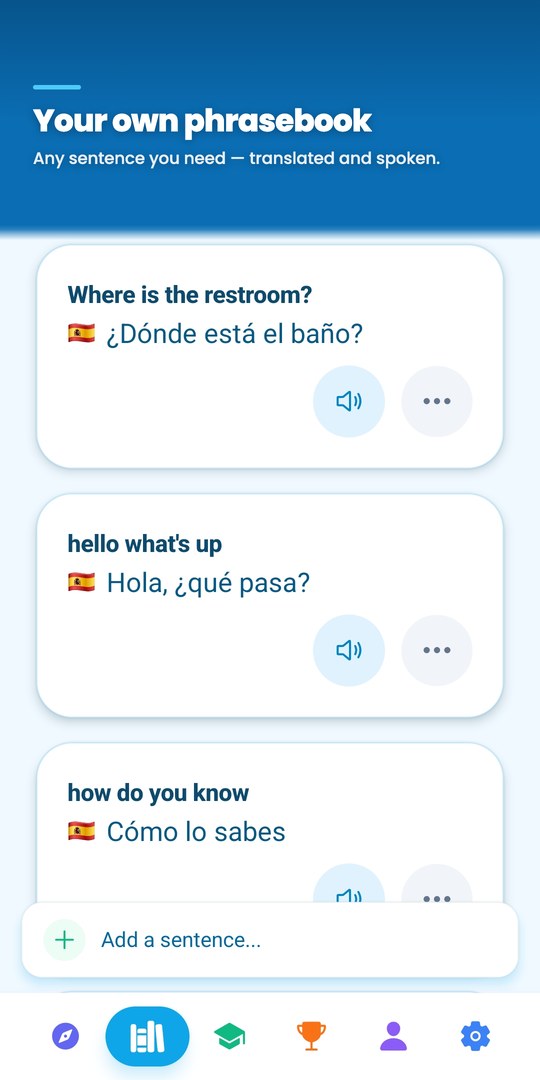
An Anki card is exactly what you type into it [2]. That is its power and its tax: front, back, audio file, reading, tags, and then the same again for the next card. PhrasiGo asks for one thing, the sentence in your own language.

From that it generates the translation with both ♂ and ♀ forms, a natural voice recording with per-word timing, a phonetic guide when the script is not Latin, and a meaning for every word you tap. The card is ready before you have finished thinking of the next one.

  • Translation with gendered forms
  • Natural audio; tap any word to hear it alone
  • Phonetic guide for Hebrew, Arabic, Japanese, Korean, Thai and more
  • Fix any translation by hand; audio regenerates
PhrasiGo phrasebook cards, each with translation and audio, generated from one typed sentence

Spaced repetition

The same memory science, switched on

Anki made spaced repetition famous, and since version 23.10 it offers FSRS, the open scheduler that models each card’s stability and difficulty. In Anki it is an option you enable in deck settings; the default is still the older SM-2 algorithm [4].

PhrasiGo runs FSRS-4.5 for everyone, on every phrase you own and every course sentence you have met, targeting 90% retention. There is nothing to configure. A strength ring on each phrase shows new, fading, solid or strong, and the Progress tab forecasts your reviews for the week ahead.

  • FSRS-4.5, retrievability target 90%
  • One ledger for your phrases and the course
  • Weekly review forecast, memory strength on every card

Practice

Review is more than flip and grade

In Anki you decide whether you knew the card. In PhrasiGo the exercise decides: you build the sentence from a word bank, tap the words you hear in order, or say it aloud and get scored word by word. A mumble becomes a free retry; a suspiciously fast “perfect” answer is rejected. Nobody grades themselves generously by accident.

Seven modes share one phrasebook and one schedule, so a phrase that is due shows up wherever you happen to practice.

  • Mixed practice, Speaking, Listening, Mistakes
  • Beat the Clock, a daily Deep Dive and Talk
  • Wrong answers get a second chance at the end of the run

Motivation

Something that brings you back tomorrow

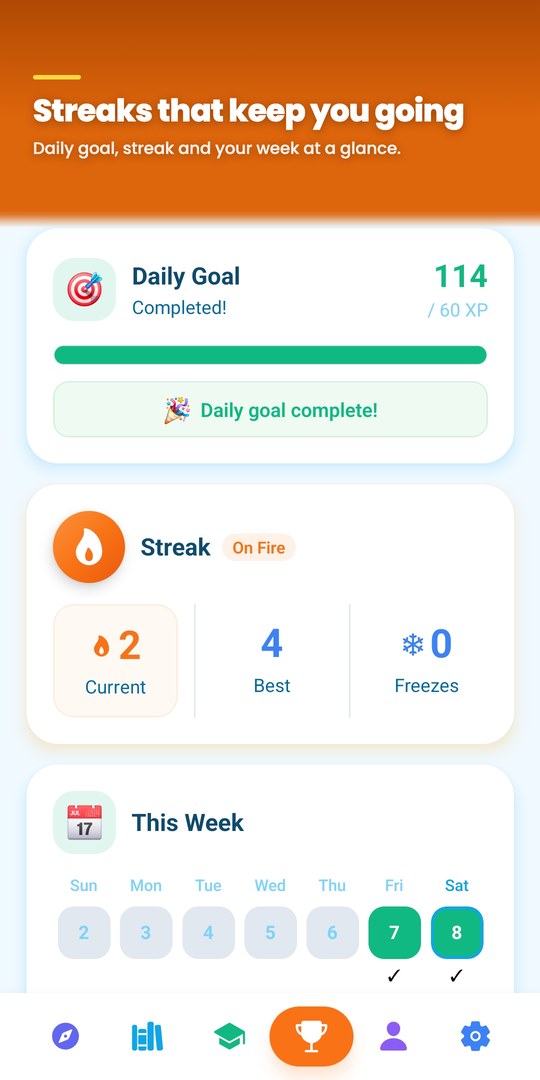
Anki is deliberately plain, and for many people that is fine. If you have ever watched a deck’s due count climb into the hundreds during a busy week, you know the other side of it. PhrasiGo adds the parts that make daily review easy to keep: a 60-XP daily goal, a streak with freezes that are applied for you, seven leagues you promote through by clearing a weekly threshold, and a coral reef where every phrase is a fish that gets hungry when it is due.

PhrasiGo progress screen: daily goal complete, streak on fire, this week at a glance

Making the move

Coming from Anki? Bring your sentences, not your deck.

PhrasiGo does not import .apkg files, so a fresh start is the honest description. Here is how to make it painless.

  1. 1

    Start with the sentences you still get wrong

    Open your leech list or your lowest-ease cards and add those sentences first. Each one is a few seconds of typing; the audio and meanings come with it.

  2. 2

    Keep the daily review ritual

    The Practice tab shows Today’s Reviews the moment they are due, and the week’s forecast is always one tap away. The daily goal takes about four minutes.

  3. 3

    Let the app grade you

    Try Speaking mode on the phrases you thought you knew. Being scored word by word is a different experience from rating yourself Good.

  4. 4

    Keep Anki for everything else

    Anatomy, capitals, chess openings: Anki remains the right tool. PhrasiGo only does languages, and does them thoroughly.

Questions people ask

Does PhrasiGo use FSRS like Anki?
Yes. PhrasiGo schedules every phrase with FSRS-4.5 using the published default parameters, targeting 90% retention, with a maximum interval of a year. It is on for everyone; there is no setting to find. In Anki, FSRS has been available since version 23.10 but is off by default and enabled per deck in the deck options.
Can I import my existing cards or word lists?
Not yet. There is no file import, so you add sentences one at a time. In practice that is fast: you type one sentence and the translation, audio, gendered forms and word meanings are generated for you. You can export everything you have built as a JSON file at any time.
Does my review schedule sync between devices?
Your sentences, folders and progress sync when you sign in with Google. The FSRS memory state itself is stored on the device for now, so if you switch phones your phrases come with you but the schedule starts fresh. Anki syncs review history through AnkiWeb; if that matters to you today, it is a real difference.
Is PhrasiGo really free, or is there a catch?
There is no paid tier in the app right now and there are no ads. Instead of a paywall, PhrasiGo has fair-use limits so nobody can run up the AI bill: signed in with Google, you can add 100 new phrases a day, do 200 speaking exercises a day and hold 30 AI conversations a day. Without an account the limits are lower. Everything else, including the whole guided course, is open.
Can I make cards for things other than languages?
No. PhrasiGo only works with sentences in one of its 35 languages, because everything it generates, translation, audio, phonetics and word meanings, depends on that. Anki is the better tool for any other subject.
Is PhrasiGo available on iPhone?
PhrasiGo ships on Android through Google Play today. The iPhone version is built from the same code and is in testing; it will appear on this site the day it is live on the App Store.

Spend the evening speaking,
not formatting cards

Type one sentence. PhrasiGo builds the rest and remembers when to bring it back.

Free · No ads · No account needed to start · iOS coming soon

Sources for the Anki claims on this page

  1. Anki official site (free desktop app, AnkiWeb sync)
  2. Wikipedia: Anki (software)
  3. Anki manual: text-to-speech in card templates
  4. Anki manual: deck options, enabling FSRS
  5. Anki on GitHub: “Make FSRS the default?” (open issue)
  6. AnkiMobile Flashcards on the App Store ($24.99)
  7. AnkiDroid on F-Droid (free, open source)
  8. RemNote: “Best Anki alternatives” (learning-curve critique)

Checked 2 September 2026. PhrasiGo claims describe the app as shipped on Google Play at the time of writing.